- Home
- Planning
Project Planning
Published: 2009-02-07
Last updated: 2022-04-21
Why is project planning important in traditional project management?
As the project manager, you want to deliver the results meeting or even exceeding the stakeholders’ expectations. This is only possible if you and your team members can be “in control” of the project during the implementation and closure phase.
To be “in control” means: you want to be able to compare actual with required results.
Therefore, you need a sufficiently detailed “list” of the required results and the activities that lead to those results.
This list is what we create in the project planning phase.
We call it the “project management plan” or “plan of actions and required results”, as highlighted in the picture of our basic project controlling cycle.
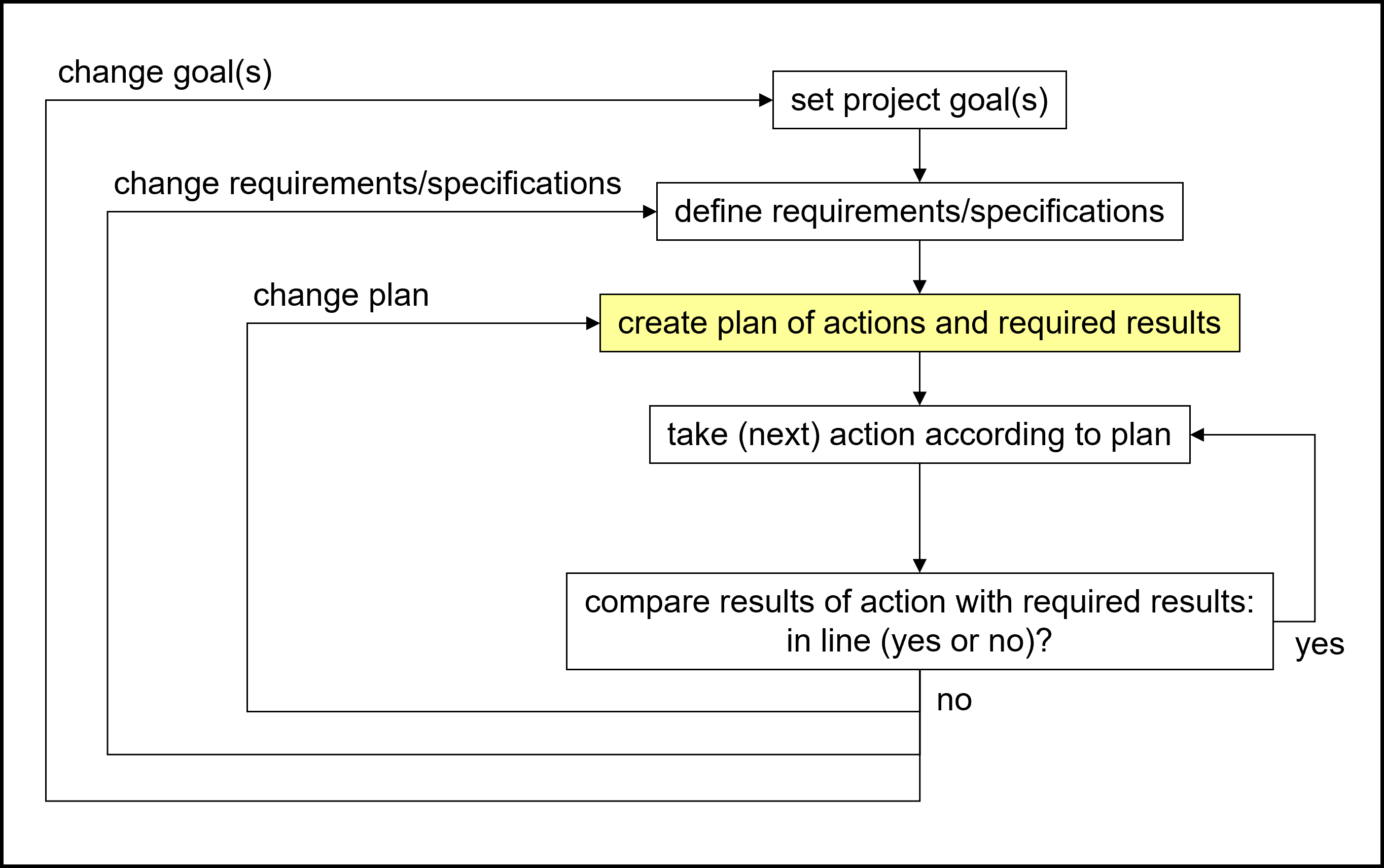
In traditional project management, the project planning phase is the second of the four phases of a linear project life cycle.

The inputs for planning are
- Project goals
- Requirements/specifications of the project results
- Project contract structure
- Stakeholder analysis
- Project charter
- Project management handbook or, at least its outline
The output of planning is the project management plan consisting of
- Core project plan
- Supporting plans
What do we need to plan?
We get the project goals as a description in terms of scope, schedule, and budget from the definition phase. This is what we have to plan for.
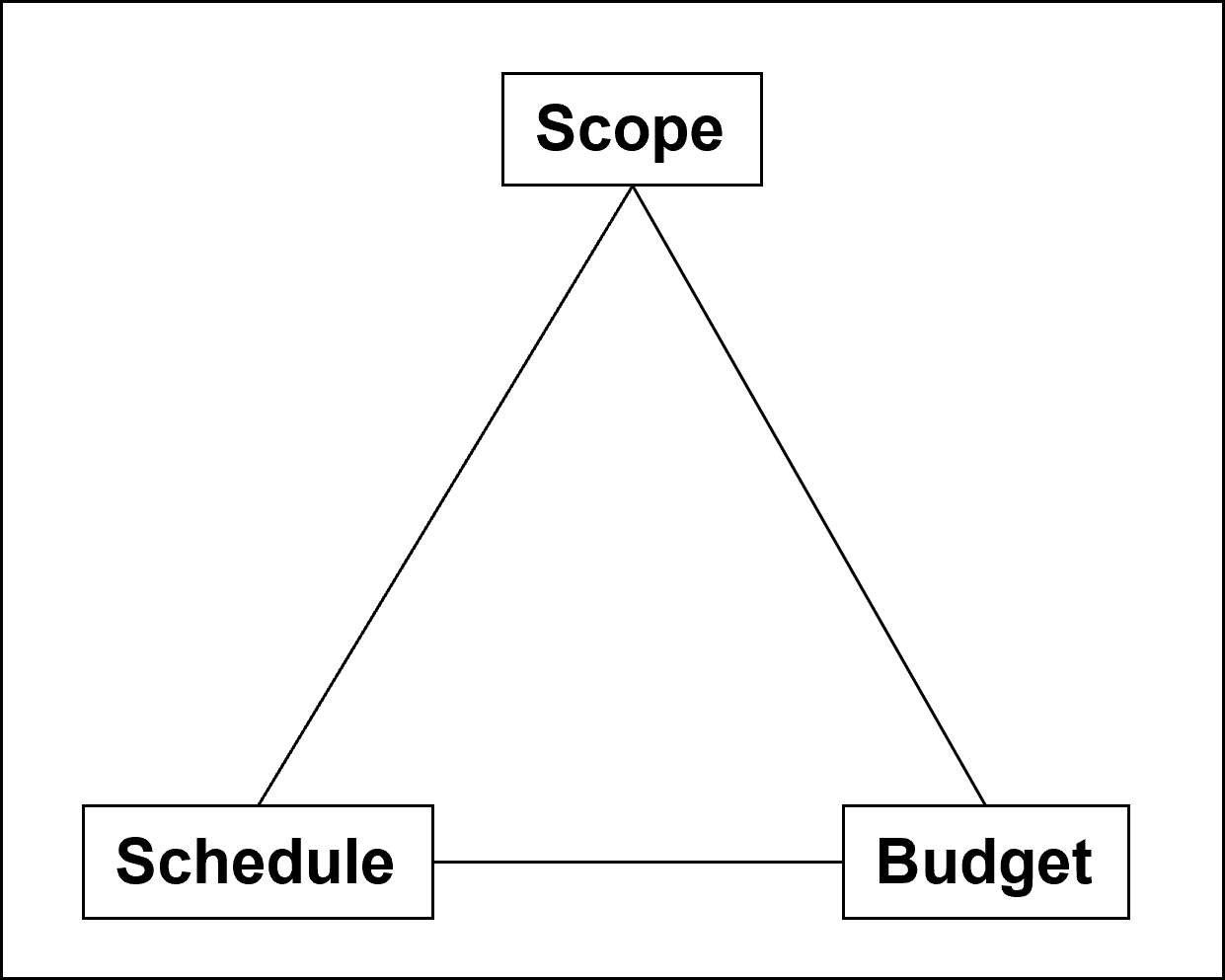
So, we need to plan how to achieve scope, schedule, and budget. The next two pictures show us the main components of scope, schedule, and budget planning as well as in what sequence we will create them.
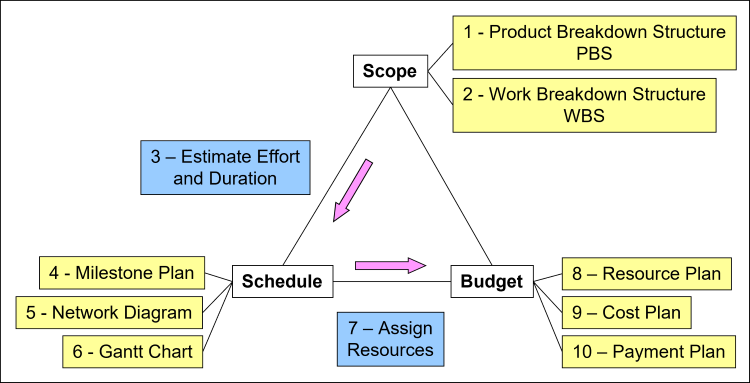
Ten steps of planning:
We can translate this triangle into a process-oriented view of the linear traditional project planning process with its ten steps.
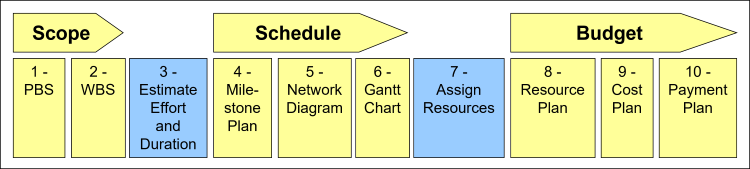
Planning the Project Scope - Steps 1 and 2
(For further reference: plan components 01 and 02, project planning)
We plan the project scope in two steps in which we create the
- Product breakdown structure, PBS, which describes the product or service we build with the project
- Work breakdown structure, WBS, that describes all the work that has to be done to build that product or service in the form of work packages
Details on planning the project scope
Effort Estimation – Step 3
(For further reference: plan component 03, project planning)
After setting up the WBS we have to estimate the effort and duration of each work package. We do this by asking the work package experts how much of what resources they need for what period, thus, obtaining the effort and duration.
Planning the Project Schedule – Steps 4, 5, and 6
(For further reference: plan components 04, 05, and 06, project planning)
Planning the project schedule consists of three steps:
- Planning the milestones
- Creating a network diagram, which is the logical sequence of all the work packages and milestones
- Setting up the Gantt chart, which is a bar chart of all work packages and milestones, relating to a timeline plus identifying and analyzing the critical path, which is the path through the project with the longest total duration
Details on planning the project schedule
Details on analyzing the critical path
Assigning Resources – Step 7
(For further reference: plan component 07, project planning)
Having prepared the project scope and schedule, we assign all the necessary resources to each one of the work packages, including human resources, tools, and material.
Details on assigning project resources
Planning the Project Budget – Steps 8, 9, and 10
(For further reference: plan components 08, 09, and 10, project planning)
Planning the project budget consists of another three steps. We create the
- Resource plan
- Cost plan
- Payment plan (for customer-contractor-based projects) or Sales plan (for product development, marketing, and sales projects)
Details on planning the project budget
How to make the plans robust
Building these plans,
- PBS and WBS
- Effort estimation
- Milestone plan, network diagram, and Gantt chart
- Assignment of resources
- Resource plan, accumulated cost plan, and payment plan
would conclude the core project planning phase.
But real life holds just too many surprises, and thus, we need to prepare for contingencies.
A “contingency” is an “eventuality” (synonym); an “event, such as an emergency, that may but is not certain to occur” (definition), according to Merriam-Webster’s online dictionary. We also use the term “unexpected event” as another synonym.
Project Risk Management and Risk Analysis
(For further reference: plan components 11 and 12, project planning)
To make our plans robust against those contingencies in the implementation and closure phase we need to set up an important component in project planning: the risk management process.
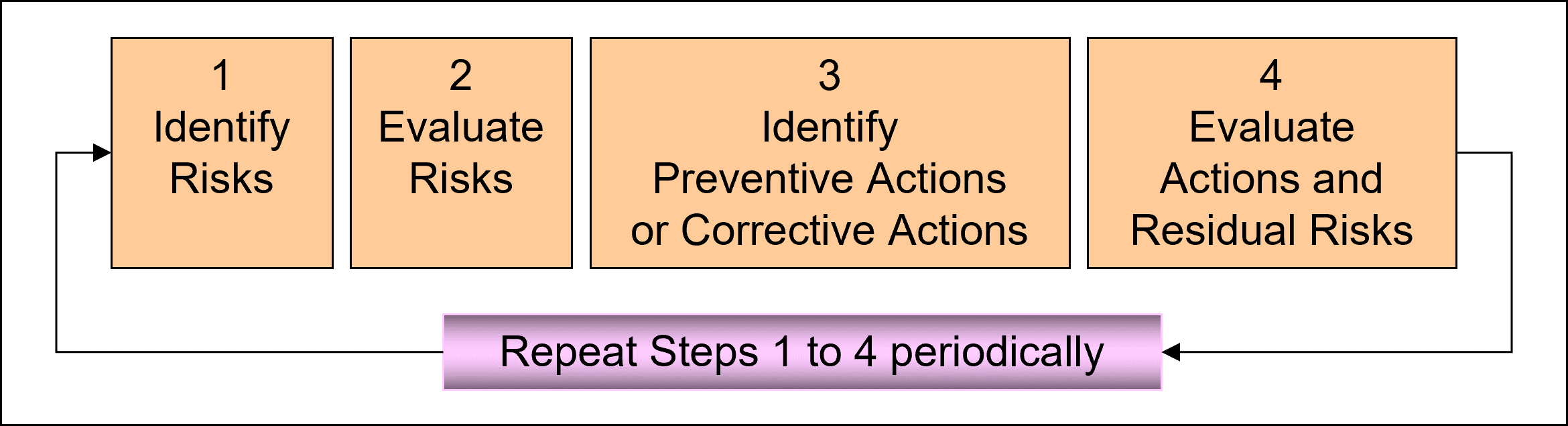


We combine these four steps into what we call “risk analysis” which we carry out in workshops. The results of such “risk analysis workshops” are
- Preventive actions
- Corrective actions
The risk management process is the repetition of risk analysis until the end of the project.
When shall we ideally start the risk management process?
Preventive or corrective actions add to already existing or even completely new work packages. So, we have to integrate them into the WBS and all the other planning documents.
Therefore, it is necessary to start the risk management process as early as possible in the project planning phase: Usually, we combine them with effort estimation.
Then we repeat the risk analysis workshops after each planning step, and later, throughout the implementation and closure phase. Thereby, the project risk management process becomes an iterative process.
Details on how to do a risk analysis
Summary of Project Planning
So far, we described the twelve components of the core project planning:
- Product and work breakdown structure, PBS and WBS
- Effort estimation
- Milestone plan, network diagram, Gantt chart, including the analysis of the critical path
- Assigning resources
- Resource, cost, and payment plan
- Risk management process and risk analysis
To be continued: Please, also visit the section Project Planning Continued on how to build the plans for
- Change management
- Contract management
- Claim management
- Controlling tools
- Communications management
Plus, what goes into the project management plan, and additional topics such as the critical chain method and choosing the right software package for planning.
35+ templates, tools, and checklists in one set
To save you time in your daily work as a project manager, I packaged more than 35 project management templates, tools, and checklists into one zip file.
- You un-zip it, and you get all items in formats you can edit to your requirements.
- They strictly contain only standard functionality and no macros or other code.
- You are allowed to use your logo.
or click here for more info.
Traditional PM
Learning Path Navigation
|
|
|
Return from Project Planning to Home Page
|
|
|
Your Comments
Have your say about what you just read! Leave me a comment in the box below.